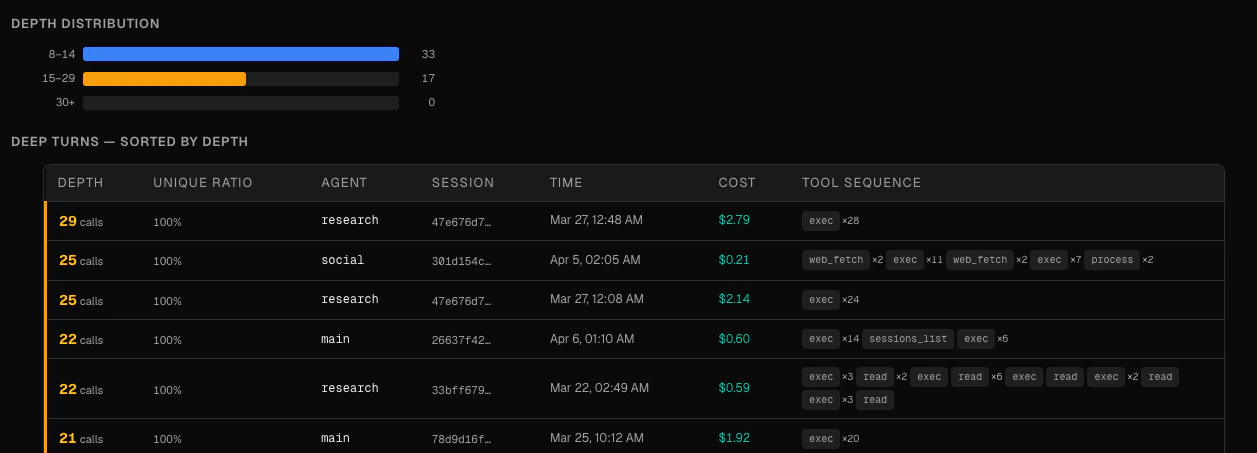
The Deep Turns page identifies turns where an agent made an unusually high number of consecutive tool calls. These often indicate that the agent is stuck — retrying a failing approach, looping through similar edits, or unable to make progress on a task.
Use this page to find the most expensive and repetitive turns across all your agents, then jump directly to the Session Timeline to understand what went wrong.
How it works
Claw Lens analyzes tool-call sequences within each turn and measures two things:
- Depth — the total number of consecutive tool calls in the turn
- Unique ratio — the proportion of distinct tool-call patterns in the sequence. A low unique ratio means the agent is repeating the same calls over and over.
Tool-call arguments are normalized before comparison: UUIDs, timestamps, and absolute paths are stripped so that two calls to the same tool with slightly different paths are treated as the same pattern.
Depth thresholds are color-coded: yellow for warn-level depth, orange for error-level, and red for severe. The exact thresholds are shown in the “How it works” tooltip on the page header.
KPI strip
Five metrics at the top of the page summarize the current view:
| Metric | Description |
|---|
| Deep turns | Total number of turns that exceed the warn-level depth threshold |
| Error or above | Turns that exceed the error-level depth threshold |
| Avg unique ratio | Average unique ratio across all deep turns — lower means more repetitive |
| Max depth | The deepest turn found in the current filter |
| Cost on deep turns | Total token cost spent on deep turns — money wasted on repetitive work |
Depth distribution
A horizontal histogram groups deep turns into three severity buckets: warn, error, and severe. This gives you a quick sense of whether deep turns are mostly mild or genuinely problematic.
Deep turns table
The table lists every deep turn found, with seven columns:
| Column | Description |
|---|
| Depth | Number of consecutive tool calls, with a color-coded left border indicating severity |
| Unique ratio | Proportion of distinct patterns, shown as a colored pill |
| Agent | The agent that produced this turn |
| Session | Session ID (click to navigate) |
| Time | When the turn occurred |
| Cost | Token cost for this turn |
| Tool sequence | The sequence of tools called, run-length encoded as pills (e.g. edit ×3 → bash ×2 → edit ×4) |
Click any row to jump directly to that turn in the Session Timeline.
Filtering and sorting
- Agent filter — select a specific agent or view all agents
- Time range — today, last 7 days, last 30 days, or all time
- Sort — by depth (deepest first), by unique ratio (most repetitive first), or by cost (most expensive first)
Empty state
If no deep turns are found, the page shows a checkmark with “No deep turns.” This changes depending on whether you have active filters — if filters are set, it means no deep turns match the current criteria, not that there are none at all.