Scan every agent session for credential exposure, dangerous shell commands, prompt injection, and behavioral anomalies.
Security Audit is a beta feature. Detection coverage and UI are evolving — feedback is welcome.
Security Audit continuously scans your OpenClaw agent sessions and surfaces security-relevant events in one place. Every tool call your agents make — file reads, shell commands, web requests — is evaluated against a set of detection rules and scored for risk. You get a filterable timeline, per-agent verdicts, a credential inventory, and a view of all active detection rules without leaving the dashboard.
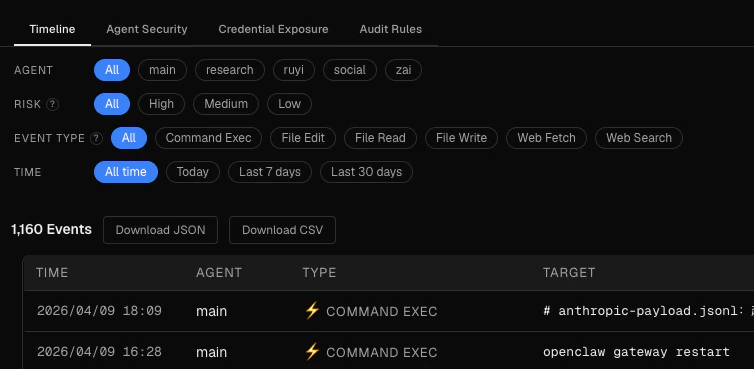
The Timeline tab shows a filterable feed of every flagged event across all sessions. Four filter rows let you narrow the view:
Agent — select a specific agent or view all
Risk — filter to high, medium, or low events only
Event type — filter by file_read, exec, web_fetch, and so on
Time — today, last 7 days, last 30 days, or all time
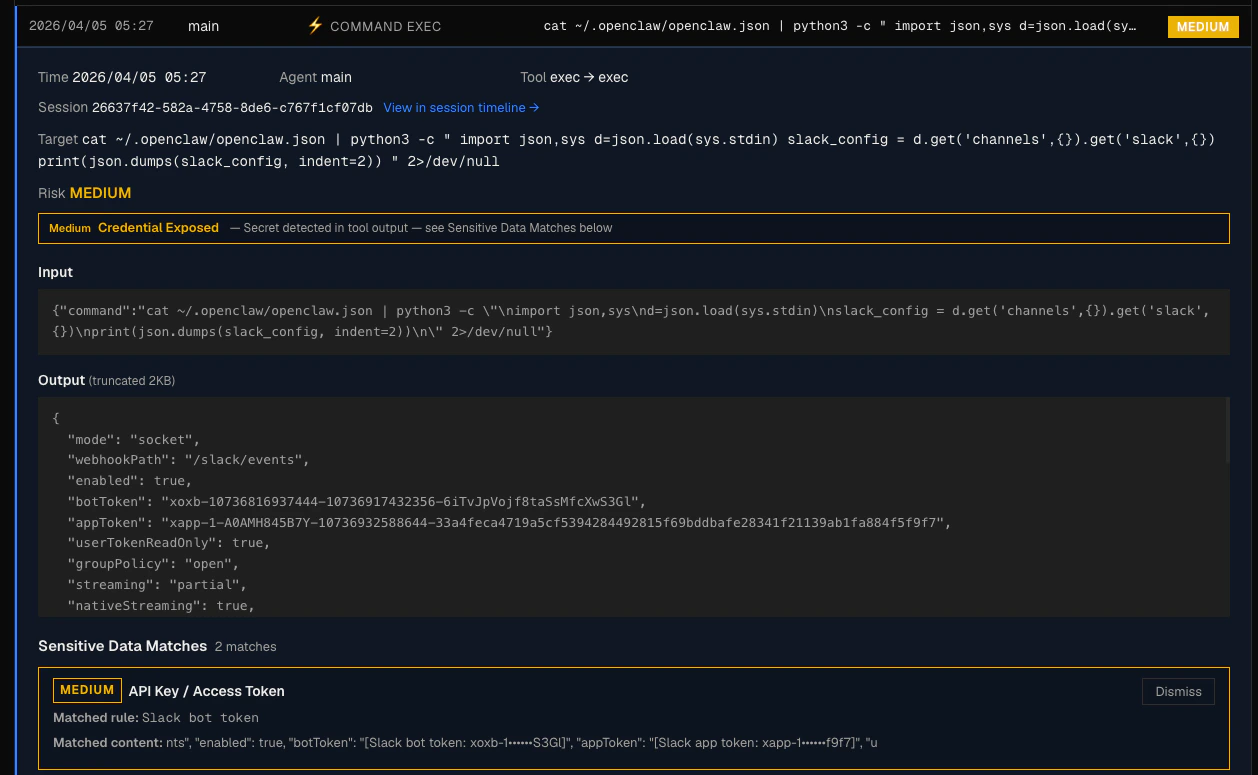
Each event in the feed shows the agent, timestamp, event type, risk level, and the target (file path, URL, or command). Click an event to see its full detail, including matched risk flags and any associated findings.
You can dismiss individual findings from the event detail view. Dismissing a finding marks it as reviewed and removes it from active counts, but keeps it in the record.
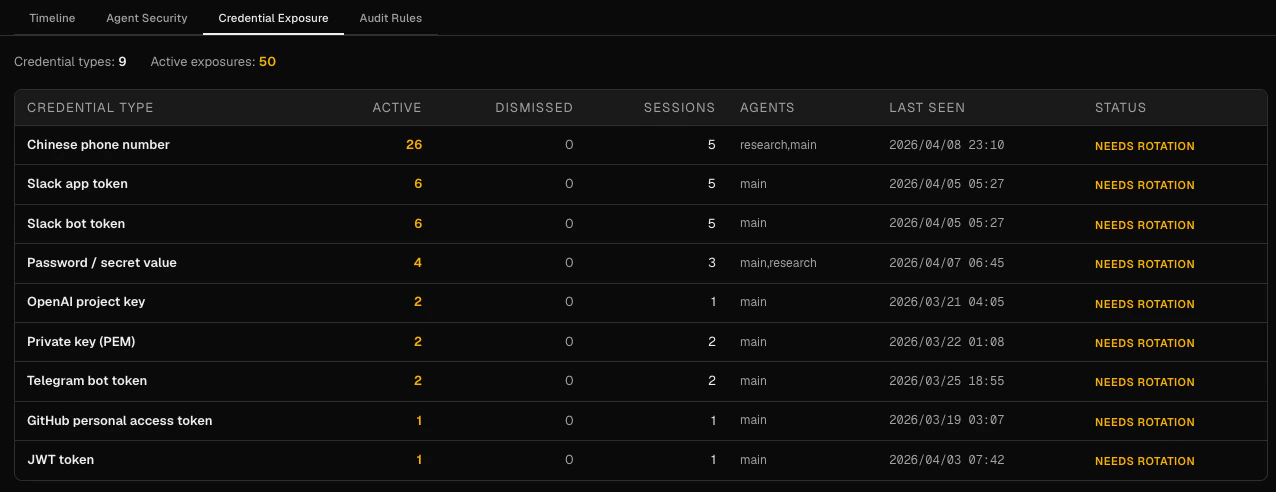
The Credentials tab aggregates all credential and secret exposures detected across sessions into a single inventory, grouped by credential type. See Credential Inventory for the full column reference and what to do when a credential is flagged.
The Audit Rules tab shows the detection rules currently active. Rules are read-only — they give you transparency on what the engine is actually checking. See Audit Rules for the complete rule reference.
{"docsConfig":{"theme":"aspen","$schema":"https://mintlify.com/docs.json","name":"Claw Lens","colors":{"primary":"#0ea5e9","light":"#e0f2fe","dark":"#0369a1"},"favicon":"https://mintcdn.com/matrix-45c0bb95/pZlDw4Xlx9vw4iyu/images/favicon-blue.svg?fit=max\u0026auto=format\u0026n=pZlDw4Xlx9vw4iyu\u0026q=85\u0026s=10d3735653fedc31ab45c824342bf07b","appearance":{"strict":false},"navbar":{"links":[{"href":"https://mail.google.com/mail/?view=cm\u0026fs=1\u0026to=sarawanghello@gmail.com","label":"Contact"}],"primary":{"type":"github","href":"https://github.com/msfirebird/claw-lens"}},"styling":{"latex":false},"navigation":{"pages":[]}},"deployment":{"deploymentMetadataValue":{"subdomain":"matrix-45c0bb95","hasAudioNarration":false,"actualSubdomain":"matrix-45c0bb95","customDomains":["claw-lens.com"],"gitSource":{"type":"github","owner":"mintlify-community","repo":"docs-matrix-45c0bb95-7ecd2724","deployBranch":"main","contentDirectory":"","isPrivate":true,"mountPath":"","label":""},"chroma":{"liveDeploymentHistoryId":"6a21dcb770c69447c7261143","collectionId":"56702b1a-4cea-405e-994d-057dff4c975d","schemaVersion":"v2"},"entitlements":{},"buildId":"6a21dcb770c69447c7261143:success","clientVersion":"0.0.3965","searchFilterCounts":[{"language":"default","tag":"Documentation","count":23},{"language":"default","tag":"Monitoring","count":7},{"language":"default","tag":"Debugging","count":5},{"language":"default","tag":"Security Audit","count":4},{"language":"default","tag":"Reference","count":3},{"language":"default","tag":"Get Started","count":2},{"language":"default","tag":"Engineering Note","count":2}]},"assistantConfig":{"enableAskAiButton":false,"enableStarterQuestions":false,"enableContextualStarterQuestions":false,"enableAskAiSearchBar":true},"hasChatPermissions":false,"hasWebMcpPermissions":false,"toggles":[{"name":"kill-isr","enabled":true,"variant":{"name":"disabled","enabled":false,"feature_enabled":true},"impressionData":false},{"name":"agent-mintlify-slack","enabled":true,"variant":{"name":"disabled","enabled":false,"feature_enabled":true},"impressionData":false},{"name":"editor-v7-file-tree","enabled":true,"variant":{"name":"disabled","enabled":false,"feature_enabled":true},"impressionData":false},{"name":"agent-integrations-settings","enabled":true,"variant":{"name":"disabled","enabled":false,"feature_enabled":true},"impressionData":false},{"name":"automations-pr-grouping","enabled":true,"variant":{"name":"disabled","enabled":false,"feature_enabled":true},"impressionData":false},{"name":"custom-prefix","enabled":true,"variant":{"name":"disabled","enabled":false,"feature_enabled":true},"impressionData":false},{"name":"analytics-v7","enabled":true,"variant":{"name":"disabled","enabled":false,"feature_enabled":true},"impressionData":false},{"name":"user-flows-analytics","enabled":true,"variant":{"name":"disabled","enabled":false,"feature_enabled":true},"impressionData":false},{"name":"no-publish-flow","enabled":true,"variant":{"name":"disabled","enabled":false,"feature_enabled":true},"impressionData":false},{"name":"workos-onboarding","enabled":true,"variant":{"name":"disabled","enabled":false,"feature_enabled":true},"impressionData":false},{"name":"llms-txt-v2","enabled":true,"variant":{"name":"disabled","enabled":false,"feature_enabled":true},"impressionData":false},{"name":"pause-universal-search-reconcile","enabled":true,"variant":{"name":"disabled","enabled":false,"feature_enabled":true},"impressionData":false},{"name":"snapshot-serving-live","enabled":true,"variant":{"name":"disabled","enabled":false,"feature_enabled":true},"impressionData":false},{"name":"stripTemperatureMiddleware","enabled":true,"variant":{"name":"disabled","enabled":false,"feature_enabled":true},"impressionData":false},{"name":"per-site-search-delta","enabled":true,"variant":{"name":"disabled","enabled":false,"feature_enabled":true},"impressionData":false},{"name":"support-platform-pylon-zendesk","enabled":true,"variant":{"name":"disabled","enabled":false,"feature_enabled":true},"impressionData":false},{"name":"snapshot-serving","enabled":true,"variant":{"name":"disabled","enabled":false,"feature_enabled":true},"impressionData":false},{"name":"instant-rollback","enabled":true,"variant":{"name":"disabled","enabled":false,"feature_enabled":true},"impressionData":false},{"name":"granular-notifications-server","enabled":true,"variant":{"name":"disabled","enabled":false,"feature_enabled":true},"impressionData":false},{"name":"granular-notifications","enabled":true,"variant":{"name":"disabled","enabled":false,"feature_enabled":true},"impressionData":false},{"name":"editor-private-page-search","enabled":true,"variant":{"name":"disabled","enabled":false,"feature_enabled":true},"impressionData":false},{"name":"automations-fable","enabled":true,"variant":{"name":"disabled","enabled":false,"feature_enabled":true},"impressionData":false},{"name":"fixed-ai-action-pricing","enabled":true,"variant":{"name":"disabled","enabled":false,"feature_enabled":true},"impressionData":false},{"name":"automation-resolve-merge-conflict","enabled":true,"variant":{"name":"disabled","enabled":false,"feature_enabled":true},"impressionData":false},{"name":"scoped-publishing","enabled":true,"variant":{"name":"disabled","enabled":false,"feature_enabled":true},"impressionData":false},{"name":"mintql","enabled":true,"variant":{"name":"disabled","enabled":false,"feature_enabled":true},"impressionData":false},{"name":"page-level-analytics","enabled":true,"variant":{"name":"disabled","enabled":false,"feature_enabled":true},"impressionData":false},{"name":"editor-version-history-v2","enabled":true,"variant":{"name":"disabled","enabled":false,"feature_enabled":true},"impressionData":false},{"name":"editor-nav-generations","enabled":true,"variant":{"name":"disabled","enabled":false,"feature_enabled":true},"impressionData":false},{"name":"billing-page-v2","enabled":true,"variant":{"name":"disabled","enabled":false,"feature_enabled":true},"impressionData":false},{"name":"workspace-projects","enabled":true,"variant":{"name":"disabled","enabled":false,"feature_enabled":true},"impressionData":false},{"name":"assistant-v5","enabled":true,"variant":{"name":"disabled","enabled":false,"feature_enabled":true},"impressionData":false},{"name":"byok-sep-25","enabled":true,"variant":{"name":"disabled","enabled":false,"feature_enabled":true},"impressionData":false},{"name":"fork-pr-previews","enabled":true,"variant":{"name":"disabled","enabled":false,"feature_enabled":true},"impressionData":false},{"name":"revalidation-jwt","enabled":true,"variant":{"name":"disabled","enabled":false,"feature_enabled":true},"impressionData":false},{"name":"vite-origin","enabled":true,"variant":{"name":"disabled","enabled":false,"feature_enabled":true},"impressionData":false},{"name":"editor-agent-model-picker","enabled":true,"variant":{"name":"disabled","enabled":false,"feature_enabled":true},"impressionData":false},{"name":"billing-updated-9-15","enabled":true,"variant":{"name":"disabled","enabled":false,"feature_enabled":true},"impressionData":false},{"name":"hobby-abuse-scan","enabled":true,"variant":{"name":"disabled","enabled":false,"feature_enabled":true},"impressionData":false},{"name":"dashboard-inbox","enabled":true,"variant":{"name":"disabled","enabled":false,"feature_enabled":true},"impressionData":false}],"isAtlas":false,"googleFontsInlined":false},"customCss":[],"page":{"pagePath":"audit/overview","slug":"/audit/overview","pageMetadata":{"title":"Security Audit","description":"Scan every agent session for credential exposure, dangerous shell commands, prompt injection, and behavioral anomalies.","href":"/audit/overview"},"description":{"compiledSource":"\"use strict\";\nconst {jsx: _jsx} = arguments[0];\nconst {useMDXComponents: _provideComponents} = arguments[0];\nfunction _createMdxContent(props) {\n const _components = {\n p: \"p\",\n ..._provideComponents(),\n ...props.components\n };\n return _jsx(_components.p, {\n children: \"Scan every agent session for credential exposure, dangerous shell commands, prompt injection, and behavioral anomalies.\"\n });\n}\nfunction MDXContent(props = {}) {\n const {wrapper: MDXLayout} = {\n ..._provideComponents(),\n ...props.components\n };\n return MDXLayout ? _jsx(MDXLayout, {\n ...props,\n children: _jsx(_createMdxContent, {\n ...props\n })\n }) : _createMdxContent(props);\n}\nreturn {\n default: MDXContent\n};\n","frontmatter":{},"scope":{}},"pageType":"default","mdx":{"mdxSource":{"compiledSource":"\"use strict\";const{Fragment:_Fragment,jsx:_jsx,jsxs:_jsxs}=arguments[0];const{useMDXComponents:_provideComponents}=arguments[0];function _createMdxContent(props){const _components={a:`a`,code:`code`,li:`li`,p:`p`,strong:`strong`,tbody:`tbody`,td:`td`,th:`th`,thead:`thead`,tr:`tr`,ul:`ul`,..._provideComponents(),...props.components},{Frame,Heading,Note,OptimizedImage,Table}=_components;if(!Frame)_missingMdxReference(`Frame`,true);if(!Heading)_missingMdxReference(`Heading`,true);if(!Note)_missingMdxReference(`Note`,true);if(!OptimizedImage)_missingMdxReference(`OptimizedImage`,true);if(!Table)_missingMdxReference(`Table`,true);return _jsxs(_Fragment,{children:[_jsx(Note,{children:_jsx(_components.p,{children:`Security Audit is a beta feature. Detection coverage and UI are evolving — feedback is welcome.`})}),`\n`,_jsx(_components.p,{children:`Security Audit continuously scans your OpenClaw agent sessions and surfaces security-relevant events in one place. Every tool call your agents make — file reads, shell commands, web requests — is evaluated against a set of detection rules and scored for risk. You get a filterable timeline, per-agent verdicts, a credential inventory, and a view of all active detection rules without leaving the dashboard.`}),`\n`,_jsx(Heading,{level:`2`,id:`event-types`,children:`Event types`}),`\n`,_jsx(_components.p,{children:`The audit engine tracks five event types across all agent sessions:`}),`\n`,_jsxs(Table,{children:[_jsx(_components.thead,{children:_jsxs(_components.tr,{children:[_jsx(_components.th,{children:`Event type`}),_jsx(_components.th,{children:`Tool(s)`}),_jsx(_components.th,{children:`What it covers`})]})}),_jsxs(_components.tbody,{children:[_jsxs(_components.tr,{children:[_jsx(_components.td,{children:_jsx(_components.code,{children:`file_read`})}),_jsxs(_components.td,{children:[_jsx(_components.code,{children:`read`}),`, `,_jsx(_components.code,{children:`image`})]}),_jsx(_components.td,{children:`Files read by the agent, including images`})]}),_jsxs(_components.tr,{children:[_jsx(_components.td,{children:_jsx(_components.code,{children:`file_write`})}),_jsx(_components.td,{children:_jsx(_components.code,{children:`write`})}),_jsx(_components.td,{children:`Files created by the agent`})]}),_jsxs(_components.tr,{children:[_jsx(_components.td,{children:_jsx(_components.code,{children:`file_edit`})}),_jsx(_components.td,{children:_jsx(_components.code,{children:`edit`})}),_jsx(_components.td,{children:`Files modified by the agent`})]}),_jsxs(_components.tr,{children:[_jsx(_components.td,{children:_jsx(_components.code,{children:`exec`})}),_jsxs(_components.td,{children:[_jsx(_components.code,{children:`bash`}),`, `,_jsx(_components.code,{children:`exec`}),`, `,_jsx(_components.code,{children:`computer`})]}),_jsx(_components.td,{children:`Shell commands and system-level actions executed by the agent`})]}),_jsxs(_components.tr,{children:[_jsx(_components.td,{children:_jsx(_components.code,{children:`web_fetch`})}),_jsx(_components.td,{children:_jsx(_components.code,{children:`web_fetch`})}),_jsx(_components.td,{children:`Outbound HTTP requests made by the agent`})]}),_jsxs(_components.tr,{children:[_jsx(_components.td,{children:_jsx(_components.code,{children:`web_search`})}),_jsx(_components.td,{children:_jsx(_components.code,{children:`web_search`})}),_jsx(_components.td,{children:`Web search queries issued by the agent`})]})]})]}),`\n`,_jsx(Heading,{level:`2`,id:`kpi-strip`,children:`KPI strip`}),`\n`,_jsx(_components.p,{children:`At the top of the page, three counters give you an at-a-glance summary of the current state:`}),`\n`,_jsxs(_components.ul,{children:[`\n`,_jsxs(_components.li,{children:[_jsx(_components.strong,{children:`High risk`}),` — events scored at level 3: confirmed exfiltration paths, critical shell commands, or prompt injection`]}),`\n`,_jsxs(_components.li,{children:[_jsx(_components.strong,{children:`Medium risk`}),` — events scored at level 2: credential exposure, elevated commands, or unknown domains`]}),`\n`,_jsxs(_components.li,{children:[_jsx(_components.strong,{children:`Low risk`}),` — events scored at level 1: sensitive file access, behavioral anomalies`]}),`\n`]}),`\n`,_jsxs(_components.p,{children:[`See `,_jsx(_components.a,{href:`/audit/risk-scoring`,children:`Event Risk Scoring`}),` for the full breakdown of what triggers each level.`]}),`\n`,_jsx(Heading,{level:`2`,id:`tabs`,children:`Tabs`}),`\n`,_jsx(_components.p,{children:`The audit page has four tabs.`}),`\n`,_jsx(Heading,{level:`3`,id:`timeline`,children:`Timeline`}),`\n`,_jsx(Frame,{children:_jsx(OptimizedImage,{src:`https://mintcdn.com/matrix-45c0bb95/o1jVmhMjO6STXQ0h/images/audit_timeline.png?fit=max\u0026auto=format\u0026n=o1jVmhMjO6STXQ0h\u0026q=85\u0026s=5cb426ebd9a41f5592fe7053ca62b097`,alt:`Audit Timeline`,\"data-og-width\":`754`,width:`754`,\"data-og-height\":`369`,height:`369`,\"data-path\":`images/audit_timeline.png`,\"data-optimize\":`true`,\"data-opv\":`3`,srcset:`https://mintcdn.com/matrix-45c0bb95/o1jVmhMjO6STXQ0h/images/audit_timeline.png?w=280\u0026fit=max\u0026auto=format\u0026n=o1jVmhMjO6STXQ0h\u0026q=85\u0026s=6fdb4d2580bdc1b6ec13098dab03fc73 280w, https://mintcdn.com/matrix-45c0bb95/o1jVmhMjO6STXQ0h/images/audit_timeline.png?w=560\u0026fit=max\u0026auto=format\u0026n=o1jVmhMjO6STXQ0h\u0026q=85\u0026s=a2373d4a3fbbe727e4b1c297739d5b32 560w, https://mintcdn.com/matrix-45c0bb95/o1jVmhMjO6STXQ0h/images/audit_timeline.png?w=840\u0026fit=max\u0026auto=format\u0026n=o1jVmhMjO6STXQ0h\u0026q=85\u0026s=54e0bad4faf883a2e682505c8364aa0d 840w, https://mintcdn.com/matrix-45c0bb95/o1jVmhMjO6STXQ0h/images/audit_timeline.png?w=1100\u0026fit=max\u0026auto=format\u0026n=o1jVmhMjO6STXQ0h\u0026q=85\u0026s=c4f02b8ced623dc5a2bfd92bb4fbbc18 1100w, https://mintcdn.com/matrix-45c0bb95/o1jVmhMjO6STXQ0h/images/audit_timeline.png?w=1650\u0026fit=max\u0026auto=format\u0026n=o1jVmhMjO6STXQ0h\u0026q=85\u0026s=47db468ce1052920f24142eec752fec6 1650w, https://mintcdn.com/matrix-45c0bb95/o1jVmhMjO6STXQ0h/images/audit_timeline.png?w=2500\u0026fit=max\u0026auto=format\u0026n=o1jVmhMjO6STXQ0h\u0026q=85\u0026s=e5e8779be198358a1fd6fac2b28ce138 2500w`})}),`\n`,_jsx(_components.p,{children:`The Timeline tab shows a filterable feed of every flagged event across all sessions. Four filter rows let you narrow the view:`}),`\n`,_jsxs(_components.ul,{children:[`\n`,_jsxs(_components.li,{children:[_jsx(_components.strong,{children:`Agent`}),` — select a specific agent or view all`]}),`\n`,_jsxs(_components.li,{children:[_jsx(_components.strong,{children:`Risk`}),` — filter to high, medium, or low events only`]}),`\n`,_jsxs(_components.li,{children:[_jsx(_components.strong,{children:`Event type`}),` — filter by `,_jsx(_components.code,{children:`file_read`}),`, `,_jsx(_components.code,{children:`exec`}),`, `,_jsx(_components.code,{children:`web_fetch`}),`, and so on`]}),`\n`,_jsxs(_components.li,{children:[_jsx(_components.strong,{children:`Time`}),` — today, last 7 days, last 30 days, or all time`]}),`\n`]}),`\n`,_jsx(_components.p,{children:`Each event in the feed shows the agent, timestamp, event type, risk level, and the target (file path, URL, or command). Click an event to see its full detail, including matched risk flags and any associated findings.`}),`\n`,_jsx(Frame,{children:_jsx(OptimizedImage,{src:`https://mintcdn.com/matrix-45c0bb95/o1jVmhMjO6STXQ0h/images/audit_mediumrisk.png?fit=max\u0026auto=format\u0026n=o1jVmhMjO6STXQ0h\u0026q=85\u0026s=998bc217d57cb183602667b3d59d16da`,alt:`Audit Mediumrisk`,\"data-og-width\":`1258`,width:`1258`,\"data-og-height\":`775`,height:`775`,\"data-path\":`images/audit_mediumrisk.png`,\"data-optimize\":`true`,\"data-opv\":`3`,srcset:`https://mintcdn.com/matrix-45c0bb95/o1jVmhMjO6STXQ0h/images/audit_mediumrisk.png?w=280\u0026fit=max\u0026auto=format\u0026n=o1jVmhMjO6STXQ0h\u0026q=85\u0026s=d40e53ebc03898ee3b54dcb2bf3b04b4 280w, https://mintcdn.com/matrix-45c0bb95/o1jVmhMjO6STXQ0h/images/audit_mediumrisk.png?w=560\u0026fit=max\u0026auto=format\u0026n=o1jVmhMjO6STXQ0h\u0026q=85\u0026s=92febfa2922cdeb948dcb150a22c5b23 560w, https://mintcdn.com/matrix-45c0bb95/o1jVmhMjO6STXQ0h/images/audit_mediumrisk.png?w=840\u0026fit=max\u0026auto=format\u0026n=o1jVmhMjO6STXQ0h\u0026q=85\u0026s=9d418b1d3b3dceef141eab075af57ee0 840w, https://mintcdn.com/matrix-45c0bb95/o1jVmhMjO6STXQ0h/images/audit_mediumrisk.png?w=1100\u0026fit=max\u0026auto=format\u0026n=o1jVmhMjO6STXQ0h\u0026q=85\u0026s=086db74d253c5caada69512af2e4e867 1100w, https://mintcdn.com/matrix-45c0bb95/o1jVmhMjO6STXQ0h/images/audit_mediumrisk.png?w=1650\u0026fit=max\u0026auto=format\u0026n=o1jVmhMjO6STXQ0h\u0026q=85\u0026s=2d715fd223ab43fceaf4416422703235 1650w, https://mintcdn.com/matrix-45c0bb95/o1jVmhMjO6STXQ0h/images/audit_mediumrisk.png?w=2500\u0026fit=max\u0026auto=format\u0026n=o1jVmhMjO6STXQ0h\u0026q=85\u0026s=743357517e3902f76fcbc1638dd57fc9 2500w`})}),`\n`,_jsx(_components.p,{children:`You can dismiss individual findings from the event detail view. Dismissing a finding marks it as reviewed and removes it from active counts, but keeps it in the record.`}),`\n`,_jsx(Heading,{level:`3`,id:`agent-security`,children:`Agent Security`}),`\n`,_jsx(_components.p,{children:`The Agent Security tab shows a per-agent security summary. For each agent you’ll see:`}),`\n`,_jsx(Frame,{children:_jsx(OptimizedImage,{src:`https://mintcdn.com/matrix-45c0bb95/o1jVmhMjO6STXQ0h/images/audit_agentscore.png?fit=max\u0026auto=format\u0026n=o1jVmhMjO6STXQ0h\u0026q=85\u0026s=6840825c5198076a6a158f24704cfea0`,alt:`Audit Agentscore`,\"data-og-width\":`1276`,width:`1276`,\"data-og-height\":`473`,height:`473`,\"data-path\":`images/audit_agentscore.png`,\"data-optimize\":`true`,\"data-opv\":`3`,srcset:`https://mintcdn.com/matrix-45c0bb95/o1jVmhMjO6STXQ0h/images/audit_agentscore.png?w=280\u0026fit=max\u0026auto=format\u0026n=o1jVmhMjO6STXQ0h\u0026q=85\u0026s=64e16d19e4947b2a20c072321e79d548 280w, https://mintcdn.com/matrix-45c0bb95/o1jVmhMjO6STXQ0h/images/audit_agentscore.png?w=560\u0026fit=max\u0026auto=format\u0026n=o1jVmhMjO6STXQ0h\u0026q=85\u0026s=4aa31ecb3fce6fdc691f2422b309de4f 560w, https://mintcdn.com/matrix-45c0bb95/o1jVmhMjO6STXQ0h/images/audit_agentscore.png?w=840\u0026fit=max\u0026auto=format\u0026n=o1jVmhMjO6STXQ0h\u0026q=85\u0026s=179fe1c348cbbae0082b6931323b14cc 840w, https://mintcdn.com/matrix-45c0bb95/o1jVmhMjO6STXQ0h/images/audit_agentscore.png?w=1100\u0026fit=max\u0026auto=format\u0026n=o1jVmhMjO6STXQ0h\u0026q=85\u0026s=04540c923379c300ccbed81d04bbc16b 1100w, https://mintcdn.com/matrix-45c0bb95/o1jVmhMjO6STXQ0h/images/audit_agentscore.png?w=1650\u0026fit=max\u0026auto=format\u0026n=o1jVmhMjO6STXQ0h\u0026q=85\u0026s=db6e01651514993b9cd06c7cf09153b1 1650w, https://mintcdn.com/matrix-45c0bb95/o1jVmhMjO6STXQ0h/images/audit_agentscore.png?w=2500\u0026fit=max\u0026auto=format\u0026n=o1jVmhMjO6STXQ0h\u0026q=85\u0026s=16cfcb4609530158d4b380a4ae0440bb 2500w`})}),`\n`,_jsxs(_components.ul,{children:[`\n`,_jsxs(_components.li,{children:[_jsx(_components.strong,{children:`Risk Level`}),` — `,_jsx(_components.code,{children:`safe`}),`, `,_jsx(_components.code,{children:`caution`}),`, or `,_jsx(_components.code,{children:`unsafe`}),` (see `,_jsx(_components.a,{href:`/audit/risk-scoring`,children:`Risk Scoring`}),` for how levels are assigned)`]}),`\n`,_jsxs(_components.li,{children:[_jsx(_components.strong,{children:`Network Trust`}),` — describes the agent’s network behavior:`,`\n`,_jsxs(_components.ul,{children:[`\n`,_jsxs(_components.li,{children:[_jsx(_components.code,{children:`local`}),` — the agent made no external network calls`]}),`\n`,_jsxs(_components.li,{children:[_jsx(_components.code,{children:`transparent`}),` — the agent made external calls, all to known domains`]}),`\n`,_jsxs(_components.li,{children:[_jsx(_components.code,{children:`opaque`}),` — the agent contacted unknown domains or triggered an exfiltration pattern`]}),`\n`]}),`\n`]}),`\n`,_jsxs(_components.li,{children:[_jsx(_components.strong,{children:`Footprint`}),` — which tools the agent used, which directories it accessed, and which external domains it contacted`]}),`\n`]}),`\n`,_jsx(Heading,{level:`3`,id:`credentials`,children:`Credentials`}),`\n`,_jsx(Frame,{children:_jsx(OptimizedImage,{src:`https://mintcdn.com/matrix-45c0bb95/o1jVmhMjO6STXQ0h/images/audit_credential.png?fit=max\u0026auto=format\u0026n=o1jVmhMjO6STXQ0h\u0026q=85\u0026s=cddb2d7322e892608c66bf7412baac51`,alt:`Audit Credential`,\"data-og-width\":`1276`,width:`1276`,\"data-og-height\":`492`,height:`492`,\"data-path\":`images/audit_credential.png`,\"data-optimize\":`true`,\"data-opv\":`3`,srcset:`https://mintcdn.com/matrix-45c0bb95/o1jVmhMjO6STXQ0h/images/audit_credential.png?w=280\u0026fit=max\u0026auto=format\u0026n=o1jVmhMjO6STXQ0h\u0026q=85\u0026s=a5cbfcb627b6eab30d2c62bb88442ae8 280w, https://mintcdn.com/matrix-45c0bb95/o1jVmhMjO6STXQ0h/images/audit_credential.png?w=560\u0026fit=max\u0026auto=format\u0026n=o1jVmhMjO6STXQ0h\u0026q=85\u0026s=211c33d2157b1eb4e88a14286013ac32 560w, https://mintcdn.com/matrix-45c0bb95/o1jVmhMjO6STXQ0h/images/audit_credential.png?w=840\u0026fit=max\u0026auto=format\u0026n=o1jVmhMjO6STXQ0h\u0026q=85\u0026s=cdb60db91cc6adfa793a08cdf5697e58 840w, https://mintcdn.com/matrix-45c0bb95/o1jVmhMjO6STXQ0h/images/audit_credential.png?w=1100\u0026fit=max\u0026auto=format\u0026n=o1jVmhMjO6STXQ0h\u0026q=85\u0026s=df3bd246271291c298048ef57970003b 1100w, https://mintcdn.com/matrix-45c0bb95/o1jVmhMjO6STXQ0h/images/audit_credential.png?w=1650\u0026fit=max\u0026auto=format\u0026n=o1jVmhMjO6STXQ0h\u0026q=85\u0026s=9f29dbda657b03aeff72c1678920d9cc 1650w, https://mintcdn.com/matrix-45c0bb95/o1jVmhMjO6STXQ0h/images/audit_credential.png?w=2500\u0026fit=max\u0026auto=format\u0026n=o1jVmhMjO6STXQ0h\u0026q=85\u0026s=d46dc5a83f94513f5e78ace548353ca9 2500w`})}),`\n`,_jsxs(_components.p,{children:[`The Credentials tab aggregates all credential and secret exposures detected across sessions into a single inventory, grouped by credential type. See `,_jsx(_components.a,{href:`/audit/credential-inventory`,children:`Credential Inventory`}),` for the full column reference and what to do when a credential is flagged.`]}),`\n`,_jsx(Heading,{level:`3`,id:`audit-rules`,children:`Audit Rules`}),`\n`,_jsxs(_components.p,{children:[`The Audit Rules tab shows the detection rules currently active. Rules are read-only — they give you transparency on what the engine is actually checking. See `,_jsx(_components.a,{href:`/audit/audit-rules`,children:`Audit Rules`}),` for the complete rule reference.`]})]})}function MDXContent(props={}){const{wrapper:MDXLayout}={..._provideComponents(),...props.components};return MDXLayout?_jsx(MDXLayout,{...props,children:_jsx(_createMdxContent,{...props})}):_createMdxContent(props)}return{default:MDXContent};function _missingMdxReference(id,component){throw new Error(`Expected `+(component?`component`:`object`)+\" `\"+id+\"` to be defined: you likely forgot to import, pass, or provide it.\")}","frontmatter":{},"scope":{"config":{},"pageMetadata":{"title":"Security Audit","description":"Scan every agent session for credential exposure, dangerous shell commands, prompt injection, and behavioral anomalies.","href":"/audit/overview"}}},"mdxSourceWithNoJs":null},"mdxExtracts":{"tableOfContents":[{"title":"Event types","slug":"event-types","depth":2,"children":[]},{"title":"KPI strip","slug":"kpi-strip","depth":2,"children":[]},{"title":"Tabs","slug":"tabs","depth":2,"children":[{"title":"Timeline","slug":"timeline","depth":3,"children":[]},{"title":"Agent Security","slug":"agent-security","depth":3,"children":[]},{"title":"Credentials","slug":"credentials","depth":3,"children":[]},{"title":"Audit Rules","slug":"audit-rules","depth":3,"children":[]}]}],"codeExamples":{}},"jsLinks":[],"subdomain":"matrix-45c0bb95","siteName":"Claw Lens","title":"Security Audit - Claw Lens","navMaps":{"firstHrefInVersion":{},"firstHrefInLanguage":{}},"lastModified":"2026-04-10T05:00:15.383Z","originalFileLocation":"audit/overview.mdx"},"headHtml":"\u003cscript data-mint-head>(function(){var d=document.documentElement,p=null;if(!p){try{p=localStorage.getItem(\"isDarkMode\")}catch(e){}if(p==='true')p='dark';else if(p==='false')p='light';if(p!=='light'\u0026\u0026p!=='dark'\u0026\u0026p!=='system')p=\"system\"}var r=p==='system'?(matchMedia(\"(prefers-color-scheme: dark)\").matches?'dark':'light'):p;d.classList.remove(r==='dark'?'light':'dark');d.classList.add(r);d.setAttribute(\"data-theme-preference\",p)})();\u003c/script>\u003cmeta data-mint-head name=\"description\" content=\"Scan every agent session for credential exposure, dangerous shell commands, prompt injection, and behavioral anomalies.\">\u003cmeta data-mint-head name=\"application-name\" content=\"Claw Lens\">\u003cmeta data-mint-head name=\"generator\" content=\"Mintlify\">\u003clink data-mint-head rel=\"icon\" type=\"image/png\" sizes=\"192x192\" href=\"/mintlify-assets/_mintlify/favicons/matrix-45c0bb95/8gjiSJZyXzUjMhwn/_generated/favicon/android-chrome-192x192.png\" media=\"(prefers-color-scheme: light)\">\u003clink data-mint-head rel=\"apple-touch-icon\" type=\"image/png\" sizes=\"180x180\" href=\"/mintlify-assets/_mintlify/favicons/matrix-45c0bb95/8gjiSJZyXzUjMhwn/_generated/favicon/apple-touch-icon.png\">\u003clink data-mint-head rel=\"icon\" type=\"image/png\" sizes=\"16x16\" href=\"/mintlify-assets/_mintlify/favicons/matrix-45c0bb95/8gjiSJZyXzUjMhwn/_generated/favicon/favicon-16x16.png\" media=\"(prefers-color-scheme: light)\">\u003clink data-mint-head rel=\"icon\" type=\"image/png\" sizes=\"32x32\" href=\"/mintlify-assets/_mintlify/favicons/matrix-45c0bb95/8gjiSJZyXzUjMhwn/_generated/favicon/favicon-32x32.png\" media=\"(prefers-color-scheme: light)\">\u003clink data-mint-head rel=\"shortcut icon\" type=\"image/x-icon\" href=\"/mintlify-assets/_mintlify/favicons/matrix-45c0bb95/8gjiSJZyXzUjMhwn/_generated/favicon/favicon.ico\" media=\"(prefers-color-scheme: light)\">\u003clink data-mint-head rel=\"icon\" type=\"image/png\" sizes=\"192x192\" href=\"/mintlify-assets/_mintlify/favicons/matrix-45c0bb95/8gjiSJZyXzUjMhwn/_generated/favicon-dark/android-chrome-192x192.png\" media=\"(prefers-color-scheme: dark)\">\u003clink data-mint-head rel=\"icon\" type=\"image/png\" sizes=\"16x16\" href=\"/mintlify-assets/_mintlify/favicons/matrix-45c0bb95/8gjiSJZyXzUjMhwn/_generated/favicon-dark/favicon-16x16.png\" media=\"(prefers-color-scheme: dark)\">\u003clink data-mint-head rel=\"icon\" type=\"image/png\" sizes=\"32x32\" href=\"/mintlify-assets/_mintlify/favicons/matrix-45c0bb95/8gjiSJZyXzUjMhwn/_generated/favicon-dark/favicon-32x32.png\" media=\"(prefers-color-scheme: dark)\">\u003clink data-mint-head rel=\"shortcut icon\" type=\"image/x-icon\" href=\"/mintlify-assets/_mintlify/favicons/matrix-45c0bb95/8gjiSJZyXzUjMhwn/_generated/favicon-dark/favicon.ico\" media=\"(prefers-color-scheme: dark)\">\u003cmeta data-mint-head property=\"og:title\" content=\"Security Audit - Claw Lens\">\u003cmeta data-mint-head property=\"og:description\" content=\"Scan every agent session for credential exposure, dangerous shell commands, prompt injection, and behavioral anomalies.\">\u003cmeta data-mint-head property=\"og:site_name\" content=\"Claw Lens\">\u003cmeta data-mint-head property=\"og:url\" content=\"https://claw-lens.com/audit/overview\">\u003cmeta data-mint-head property=\"og:type\" content=\"website\">\u003cmeta data-mint-head property=\"og:image\" content=\"https://matrix-45c0bb95.mintlify.app/_mintlify/api/og/v2?division=Security+Audit\u0026amp;title=Security+Audit\u0026amp;description=Scan+every+agent+session+for+credential+exposure%2C+dangerous+shell+commands%2C+prompt+injection%2C+and+behavioral+anomalies.\u0026amp;theme=ba4cd0e4c6372cea5bec5eae\u0026amp;signature=daf42c26675d57540e9a471ec65b52ecb9bb166b9ceb7a588338d40de901cda8\">\u003cmeta data-mint-head property=\"og:image:width\" content=\"1200\">\u003cmeta data-mint-head property=\"og:image:height\" content=\"630\">\u003cmeta data-mint-head name=\"twitter:card\" content=\"summary_large_image\">\u003cmeta data-mint-head name=\"twitter:title\" content=\"Security Audit - Claw Lens\">\u003cmeta data-mint-head name=\"twitter:description\" content=\"Scan every agent session for credential exposure, dangerous shell commands, prompt injection, and behavioral anomalies.\">\u003cmeta data-mint-head name=\"twitter:image\" content=\"https://matrix-45c0bb95.mintlify.app/_mintlify/api/og/v2?division=Security+Audit\u0026amp;title=Security+Audit\u0026amp;description=Scan+every+agent+session+for+credential+exposure%2C+dangerous+shell+commands%2C+prompt+injection%2C+and+behavioral+anomalies.\u0026amp;theme=ba4cd0e4c6372cea5bec5eae\u0026amp;signature=daf42c26675d57540e9a471ec65b52ecb9bb166b9ceb7a588338d40de901cda8\">\u003cmeta data-mint-head name=\"twitter:image:width\" content=\"1200\">\u003cmeta data-mint-head name=\"twitter:image:height\" content=\"630\">\u003cmeta data-mint-head name=\"msapplication-config\" content=\"/mintlify-assets/_mintlify/favicons/matrix-45c0bb95/8gjiSJZyXzUjMhwn/_generated/favicon/browserconfig.xml\">\u003cmeta data-mint-head name=\"apple-mobile-web-app-title\" content=\"Claw Lens\">\u003cmeta data-mint-head name=\"msapplication-TileColor\" content=\"#0ea5e9\">\u003clink data-mint-head rel=\"canonical\" href=\"https://claw-lens.com/audit/overview\">\u003clink data-mint-head rel=\"alternate\" type=\"application/xml\" href=\"/sitemap.xml\">\u003clink data-mint-head rel=\"alternate\" type=\"text/markdown\" href=\"/audit/overview.md\">\u003cscript data-mint-head type=\"application/ld+json\">{\"@context\":\"https://schema.org\",\"@graph\":[{\"@type\":\"Organization\",\"@id\":\"https://claw-lens.com/#organization\",\"name\":\"Claw Lens\",\"url\":\"https://claw-lens.com\"},{\"@type\":\"WebSite\",\"@id\":\"https://claw-lens.com#website\",\"name\":\"Claw Lens\",\"url\":\"https://claw-lens.com\",\"publisher\":{\"@id\":\"https://claw-lens.com/#organization\"}},{\"@type\":\"WebPage\",\"@id\":\"https://claw-lens.com/audit/overview#webpage\",\"url\":\"https://claw-lens.com/audit/overview\",\"name\":\"Security Audit\",\"description\":\"Scan every agent session for credential exposure, dangerous shell commands, prompt injection, and behavioral anomalies.\",\"dateModified\":\"2026-04-10T05:00:15.383Z\",\"isPartOf\":{\"@id\":\"https://claw-lens.com#website\"},\"breadcrumb\":{\"@id\":\"https://claw-lens.com/audit/overview#breadcrumb\"}},{\"@type\":\"BreadcrumbList\",\"@id\":\"https://claw-lens.com/audit/overview#breadcrumb\",\"itemListElement\":[{\"@type\":\"ListItem\",\"position\":1,\"name\":\"Claw Lens\",\"item\":\"https://claw-lens.com\"},{\"@type\":\"ListItem\",\"position\":2,\"name\":\"Security Audit\",\"item\":\"https://claw-lens.com/audit/overview\"}]},{\"@type\":[\"Article\",\"TechArticle\"],\"@id\":\"https://claw-lens.com/audit/overview#article\",\"headline\":\"Security Audit\",\"name\":\"Security Audit\",\"description\":\"Scan every agent session for credential exposure, dangerous shell commands, prompt injection, and behavioral anomalies.\",\"url\":\"https://claw-lens.com/audit/overview\",\"mainEntityOfPage\":{\"@id\":\"https://claw-lens.com/audit/overview#webpage\"},\"dateModified\":\"2026-04-10T05:00:15.383Z\",\"publisher\":{\"@id\":\"https://claw-lens.com/#organization\"},\"isPartOf\":{\"@id\":\"https://claw-lens.com#website\"}}]}\u003c/script>\u003cscript data-mint-head type=\"application/ld+json\">{\"@context\":\"https://schema.org\",\"@type\":\"WebSite\",\"name\":\"Claw Lens\",\"creator\":{\"@type\":\"Organization\",\"name\":\"Mintlify\",\"url\":\"https://mintlify.com\"}}\u003c/script>","siteName":"Claw Lens","nav":{"global":null,"tabs":[{"tab":"Documentation","groups":[{"group":"Get Started","pages":[{"title":"Quick Start","href":"/quickstart"},{"title":"Development","href":"/development"}]},{"group":"Monitoring","pages":[{"title":"Overview","href":"/monitoring/overview"},{"title":"Token Usage","href":"/monitoring/token-usage"},{"title":"Agents","href":"/monitoring/agents"},{"title":"Live Monitor","href":"/monitoring/live-monitor"},{"title":"Sessions","href":"/monitoring/sessions"},{"title":"Cron jobs","href":"/monitoring/cron-jobs-copied-1"},{"title":"Memory viewer","href":"/monitoring/memory-viewer"}]},{"group":"Debugging","pages":[{"title":"Session timeline","href":"/debugging/session-timeline"},{"title":"Tool profiler","href":"/debugging/profiler"},{"title":"Deep Turns","href":"/debugging/deep-turn"},{"title":"Context Breakdown","href":"/debugging/context-breakdown"},{"title":"Cache Trace","description":"Debug prompt cache misses at the API-call level with pipeline flow visualization and diff between consecutive calls.","href":"/debugging/cache-trace"}]},{"group":"Security Audit","pages":[{"title":"Security Audit","href":"/audit/overview"},{"title":"Risk Scoring","description":"How Claw Lens assigns risk levels to agent events, and what each level means.","href":"/audit/risk-scoring"},{"title":"Credential Inventory","href":"/audit/credential-inventory"},{"title":"Audit Rules","href":"/audit/audit-rules"}]},{"group":"Engineering Note","pages":[{"title":"Agent Observability","href":"/engineering/agent-observability"},{"title":"Design Doc","href":"/engineering/design-doc"}]},{"group":"Reference","pages":[{"title":"CLI reference","href":"/reference/cli"},{"title":"Data Storage","href":"/reference/data-storage"},{"title":"FAQ","href":"/reference/faq"}]}]}]},"title":"Security Audit - Claw Lens","buildId":"dpl_849ArpqvBiCczQiT1Y1stNGpbqHT","deploymentId":"dpl_849ArpqvBiCczQiT1Y1stNGpbqHT","dynamics":["07c022d89b","a74be98ba7"],"chunks":["Frame-Cz91mEGH.js","DynamicMarkdown-a8hUKrw6.js","zoom-image-lightbox-CaUwvYH3.js","lightbox-handle-r17bVUz3.js"]}